https://docs.openclaw.ai/nodes
🎯 核心概念
Node 是什么?
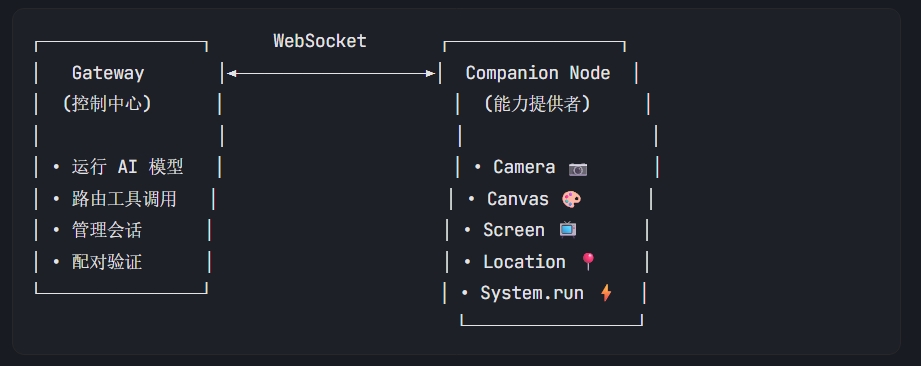
- 角色:配套设备(macOS/iOS/Android/headless),不是 Gateway
- 功能:提供特定能力(相机、画布、屏幕录制、定位、执行命令等)
- 连接:通过 WebSocket 连接到 Gateway(默认端口 18789)
- 声明角色:连接时
role: "node"
架构图
🔌 连接协议详解
1. 握手流程
// 1. Gateway 发送挑战
{"type":"event","event":"connect.challenge","payload":{"nonce":"...","ts":123456}}

// 2. Node 响应 connect(关键字段)
{
  "type": "req",
  "id": "...",
  "method": "connect",
  "params": {
    "role": "node",                    // ← 声明为 node
    "caps": ["camera", "canvas"],      // ← 能力声明
    "commands": ["camera.snap", "canvas.navigate"], // ← 支持的命令
    "permissions": {"camera.capture": true},
    "device": {
      "id": "device_fingerprint",      // ← 设备唯一标识
      "publicKey": "...",
      "signature": "...",              // ← 签名挑战 nonce
      "signedAt": 123456
    },
    "auth": {"token": "..."}           // ← Gateway token(如有)
  }
}

// 3. Gateway 响应(配对成功后返回 deviceToken)
{
  "type": "res",
  "id": "...",
  "ok": true,
  "payload": {
    "type": "hello-ok",
    "protocol": 3,
    "auth": {
      "deviceToken": "..."             // ← 保存用于下次连接
    }
  }
}
2. 配对流程
Node 首次连接 ──► Gateway 创建设备配对请求 ──► 等待批准
                                             │
管理员执行: openclaw devices approve <id> ◄───┘
                                             │
Node 收到 deviceToken ◄─── 配对成功 ◄────────┘
🛠️ 实现一个简单 Node(伪代码)
最小 Node 实现(Python 示例)
import asyncio
import websockets
import json
import hashlib
import time

class SimpleNode:
    def __init__(self, gateway_host, gateway_port, device_id):
        self.gateway_url = f"ws://{gateway_host}:{gateway_port}"
        self.device_id = device_id
        self.device_token = None  # 从文件读取或首次配对后保存
        self.challenge_nonce = None

    async def connect(self):
        self.ws = await websockets.connect(self.gateway_url)

        # 等待 challenge
        challenge_msg = await self.ws.recv()
        challenge = json.loads(challenge_msg)
        self.challenge_nonce = challenge["payload"]["nonce"]

        # 发送 connect
        connect_req = {
            "type": "req",
            "id": self.generate_id(),
            "method": "connect",
            "params": {
                "minProtocol": 3,
                "maxProtocol": 3,
                "role": "node",
                "client": {
                    "id": "my-simple-node",
                    "version": "1.0.0",
                    "platform": "linux",
                    "mode": "node"
                },
                "caps": ["system"],  # 声明能力
                "commands": ["system.run", "system.which"],  # 支持的命令
                "permissions": {},
                "device": {
                    "id": self.device_id,
                    "publicKey": self.get_public_key(),
                    "signature": self.sign_challenge(self.challenge_nonce),
                    "signedAt": int(time.time() * 1000),
                    "nonce": self.challenge_nonce
                },
                "auth": {"token": self.device_token} if self.device_token else {}
            }
        }

        await self.ws.send(json.dumps(connect_req))

        # 等待响应
        response = await self.ws.recv()
        hello_ok = json.loads(response)

        if hello_ok["ok"]:
            # 保存 device token
            if "auth" in hello_ok["payload"]:
                self.device_token = hello_ok["payload"]["auth"]["deviceToken"]
                self.save_token(self.device_token)
            print("✅ 连接成功!")
            return True
        else:
            print(f"❌ 连接失败: {hello_ok.get('error')}")
            return False

    async def handle_commands(self):
        """处理来自 Gateway 的命令调用"""
        while True:
            try:
                msg = await self.ws.recv()
                data = json.loads(msg)

                if data.get("type") == "req":
                    method = data["method"]
                    params = data.get("params", {})

                    if method == "system.run":
                        result = await self.run_command(params)
                        await self.send_response(data["id"], result)

                    elif method == "system.which":
                        result = self.check_command(params.get("command"))
                        await self.send_response(data["id"], result)

            except Exception as e:
                print(f"错误: {e}")
                break

    async def run_command(self, params):
        """执行系统命令(示例)"""
        import subprocess
        cmd = params.get("command")
        cwd = params.get("cwd")
        env = params.get("env", {})

        try:
            result = subprocess.run(
                cmd,
                shell=True,
                cwd=cwd,
                env={**os.environ, **env},
                capture_output=True,
                text=True,
                timeout=params.get("timeoutMs", 30000) / 1000
            )
            return {
                "stdout": result.stdout,
                "stderr": result.stderr,
                "exitCode": result.returncode
            }
        except Exception as e:
            return {"error": str(e)}

    async def send_response(self, req_id, payload):
        response = {
            "type": "res",
            "id": req_id,
            "ok": True,
            "payload": payload
        }
        await self.ws.send(json.dumps(response))
📋 Node 必须实现的要素
| 要素 | 说明 |
|---|
| WebSocket 连接 | 连接到 Gateway 的 WS 端口(默认 18789) |
| 设备身份 | 稳定的 device.id(建议用密钥对指纹) |
| 挑战签名 | 签名 Gateway 发送的 connect.challenge nonce |
| 能力声明 | caps + commands + permissions |
| 命令处理 | 响应 node.invoke 调用 |
| 配对状态机 | 首次配对 → 等待批准 → 获取 token → 后续自动连接 |
🔧 内置 Node 类型参考
1. Headless Node Host(Linux/Windows)
# 前台运行
openclaw node run --host <gateway> --port 18789

# 服务化
openclaw node install --host <gateway> --port 18789
openclaw node restart
- 提供
system.run 和 system.which
- 执行审批存储在
~/.openclaw/exec-approvals.json
2. macOS Node Mode
- macOS 菜单栏应用自动作为 Node 连接
- 提供
canvas.*, camera.*, system.*
3. iOS/Android Node
- 需要前台运行才能使用 Canvas/Camera
- 背景调用返回
NODE_BACKGROUND_UNAVAILABLE
💡 实现建议
- 存储 deviceToken:配对成功后保存,下次连接使用
- 自动重连:WS 断开后指数退避重试
- 心跳保持:响应 Gateway 的
tick 事件
- 权限校验:本地维护允许列表,拒绝未授权命令
- 错误处理:返回结构化错误(如
SYSTEM_RUN_DENIED)